Study N5 to N1. Then read what you actually chose.
A full JLPT study system beside a reader for the books and manga already on your device — so the word you review this morning turns up in a page you read tonight.
Updated 14 September 2026 on Google Play · version 1.0.71 · 100+ downloads

Two halves of the same habit.
Most apps hand you a deck of cards. Kotonoha hands you the deck and the thing you were learning it for — a reader for books and manga you already own, sharing one dictionary, one review schedule and one record of what you know.
N5 to N1
Vocabulary, kanji and grammar, each on its own spaced-repetition schedule, so a review comes back about when you were going to forget it.
Study, then read
Tap a word in a book and the conjugated form resolves back to its dictionary entry — the same lookup you get everywhere else in the app.
Written by hand
Stroke-order practice on a canvas, with a brush that responds to how fast you write, and a root map showing the parts each character is built from.
Kotonoha on a folding phone
-
HOME
Your whole day on one screen
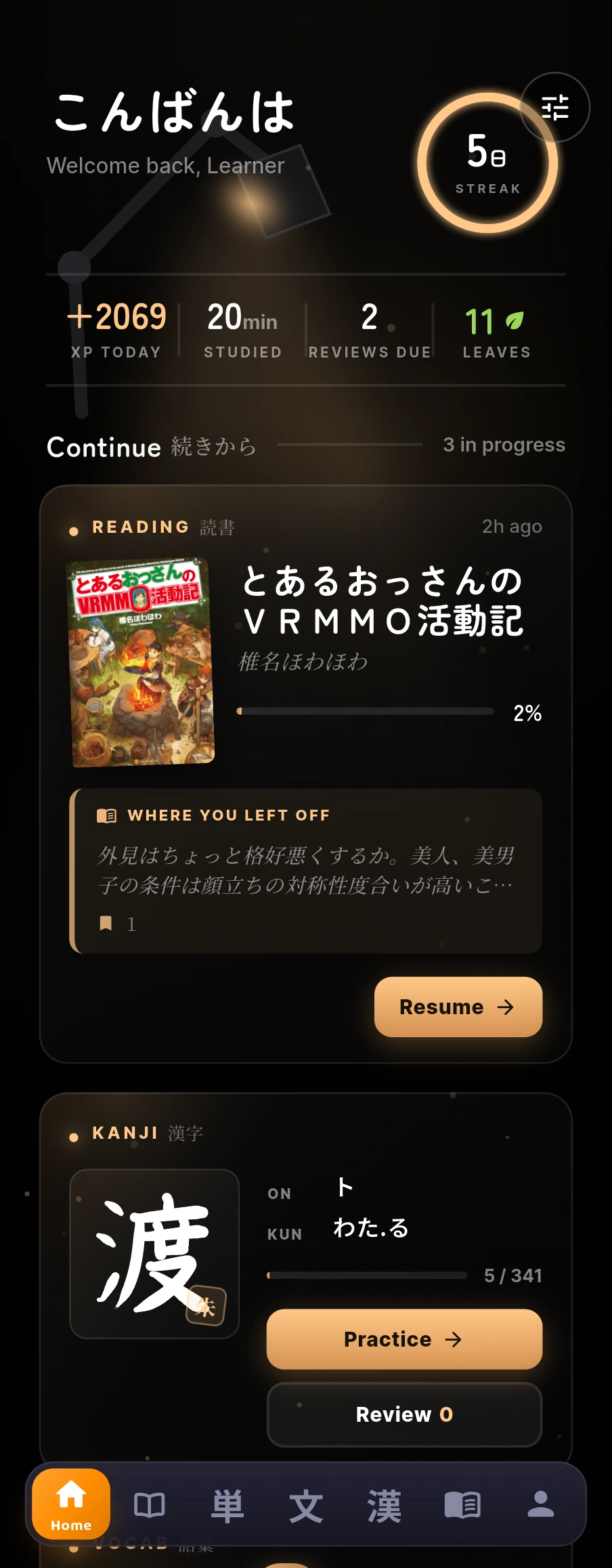
Start without unfolding anything: the cover screen carries your lesson, your reviews and your book, so two minutes on the bus is a real session rather than a login.
-
VOCABULARY · 1 OF 5
One tab, and it already knows where you left off
Choose how you want to study: continue the lesson you were in, clear the reviews that are due today, or take a two-minute speed round. Your progress through the level is counted word by word.
-
VOCABULARY · 2 OF 5
Thirty-eight lessons, in an order somebody chose
Learn related words together instead of alphabetically. Each level is split into themed lessons of sixty to eighty words, ordered by what is worth learning first.
-
VOCABULARY · 3 OF 5
Inside a lesson, before you start it
Open a lesson to see its words and how far each one has climbed before you commit to it. Learning, reviewing and speed rounds are separate, so you are never asked to review a word you have not met.
-
VOCABULARY · 4 OF 5
A word arrives with everything it needs
Meet a new word with everything it needs at once: its reading, its meanings, a sentence that uses it, audio for both, and a picture. Seven steps then carry it from that first meeting into memory.
-
VOCABULARY · 5 OF 5
And you can say you already know it
Tap any word anywhere in the app to open its card: every reading, every meaning, and examples you can hear. Mark it as known to skip it entirely, or save it into a deck of your own.
-
GRAMMAR · 1 OF 4
Grammar, and four ways into it
Study grammar four ways: the points due today, a mind map of how they relate, drills for the pairs that get confused, or a full mock paper. Every point from N5 to N1 is there.
-
GRAMMAR · 2 OF 4
Every pattern, explained and then used
Open any pattern to see what it means in plain language, how it is built, and four real sentences that use it — each one with audio, so you meet it in use rather than in a table.
-
GRAMMAR · 3 OF 4
Then you have to pick the right one
Test a pattern the moment you have read it: fill the gap in a real sentence from four plausible options, and the explanation comes back with the answer.
-
GRAMMAR · 4 OF 4
Grammar comes in families
See how patterns relate to each other — built the same way, doing the same job, or easily confused — so you learn a whole family at once instead of learning its members twice.
-
DICTIONARY · 1 OF 3
A dictionary that takes romaji
Search however the word comes to you — romaji, kana, kanji or English all find it. Filter by JLPT level, and everything you looked up stays one tap away.
-
DICTIONARY · 2 OF 3
The entry, and everything under it
Open an entry and every sense is listed on its own rather than crammed into a line, with the JLPT level, audio, and translated examples — and you can add it to your own deck from there.
-
DICTIONARY · 3 OF 3
And a few it thinks you should meet
Browse by kanji when you do not have a word in mind, or take what today's list recommends. The whole dictionary ships inside the app, so it works with no connection and nothing in it is paywalled.
-
KANJI · 1 OF 4
Every kanji in the level, on one page
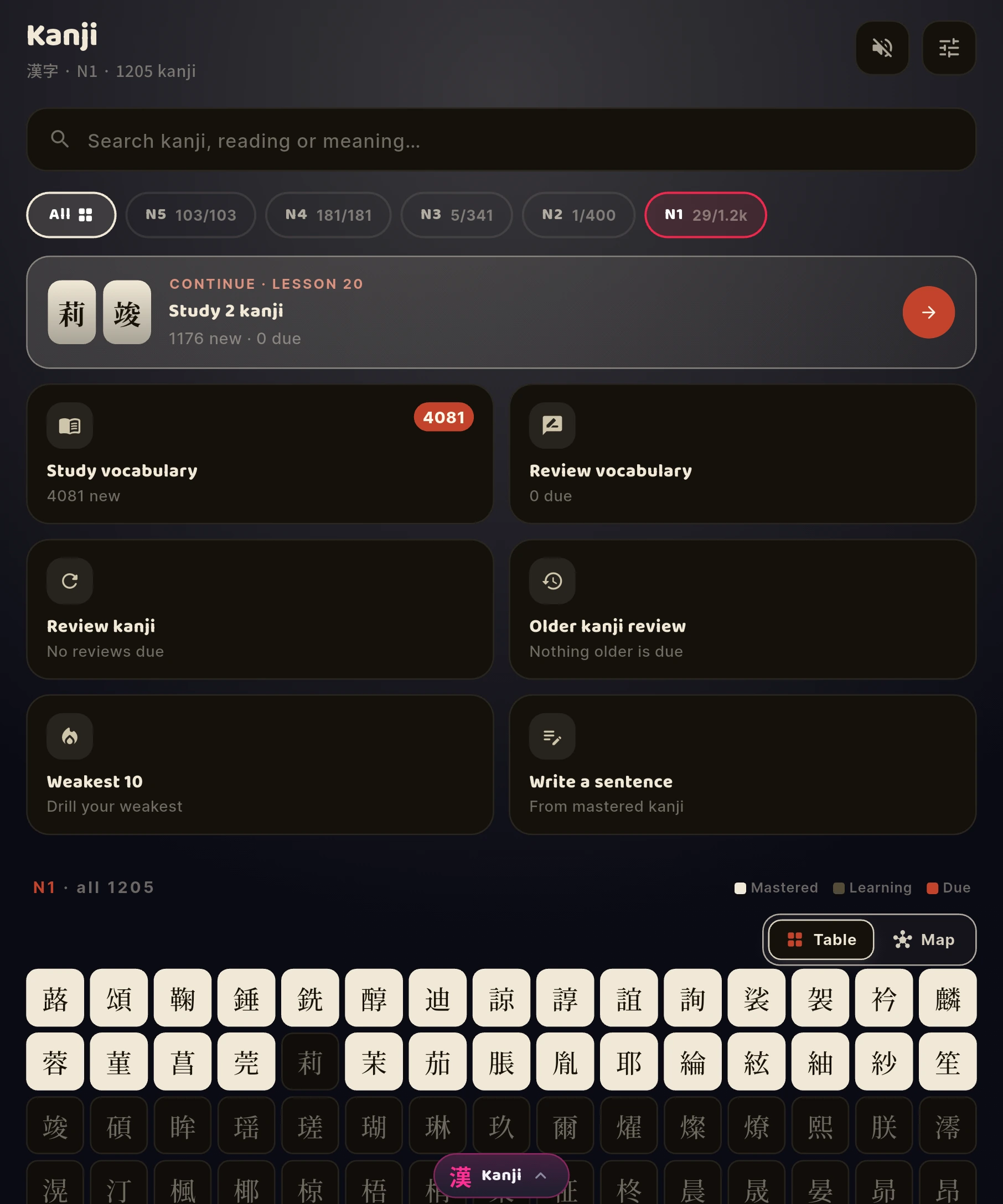
See every kanji in the level at once and tell at a glance what you have mastered, what is due today and what you have not reached yet. Search by character, by reading or by meaning.
-
KANJI · 2 OF 4
Then one of them, in full
Open any character for its readings, its meanings, the words it appears in with audio, how many strokes it takes, and where it sits on your mastery ladder.
-
KANJI · 3 OF 4
Trace it, and it tells you where you went wrong
Follow each stroke in order on the grid. Kotonoha watches the direction, the length and the order as you draw — if a stroke runs long or starts in the wrong place, it says so before you move on.
-
KANJI · 4 OF 4
Then write it with nothing to copy
A real sentence with one character missing, and a blank sheet. No outline to trace and no stroke guide — you write it from memory, the way you would on paper.
-
THE READER · 1 OF 6
Your own shelf, and your own files
Import your own EPUB, PDF, CBZ, CBR or 7z files and read them as books, novels and manga on one shelf. Your reading minutes and the words you saved are counted every day.
-
THE READER · 2 OF 6
It reads the book before you do
Every file you import is prepared for reading before you open it: its words are split, its furigana generated and a dictionary index built — which is why a lookup later answers instantly and offline.
-
THE READER · 3 OF 6
Now open it, and read real Japanese
Open any novel and read it with furigana across both halves of the screen. Tap a word you do not know and Kotonoha undoes its conjugation first, then gives you the meaning, examples, the reading and its level.
-
THE READER · 4 OF 6
And then the characters inside it
Switch the same card to its kanji tab to study the characters themselves: readings, meaning, stroke count, JLPT level, school grade, frequency rank, and what each one is built from.
-
THE READER · 5 OF 6
Manga counts as reading
Read manga exactly the same way: tap a word inside a speech bubble for its reading, its pitch accent and its meaning without leaving the page, and the minutes count towards your day like any other reading.
-
THE READER · 6 OF 6
Even the PDF you were given in class
Read the scanned PDF you were given in class too. A road-sign chart is not a novel, and it behaves like one: tap a word in the middle of a table and you get its meaning and every character it is made of.
Start today. The first review takes two minutes.
Get Kotonoha on Google PlayFour things most Japanese apps cannot say.
You never need an account.
Every learning feature works signed out. First launch offers you a Google sign-in so backup and sync are on from the start; skip it and you are never asked again. Your vocabulary, kanji, grammar and review schedule live on your device and are never uploaded to us. An optional account exists if you want one — it carries an identity, never your studying.
Your books, not ours.
Kotonoha includes no books and no manga. Import your own EPUB, PDF, CBZ, CBR or 7z and read them inside the app, with the same tap-to-look-up you get everywhere else.
Manga recognition, on your device.
Printed Japanese inside a speech bubble can be tapped in the artwork itself. The model downloads once and then runs entirely on your phone — your pages are never uploaded anywhere.
It works with no connection.
Vocabulary, kanji, grammar, your review schedule and the whole dictionary are on the device. A connection is only needed for the optional extras — voice packs, the manga recognition model, and backup. A flight is a study session.
Free to use. Two optional subscriptions if you would rather not gather leaves.
A leaf is what opens the next lesson. Some arrive every day just for opening the app, and you can gather more by choosing to watch a short video — the only ad in Kotonoha, and only when you tap for it. There are no banner ads, and never an ad inside the readers.
Free
Every level and every feature, opened with leaves you gather. Reading is charged by the minute from the same leaves.
Get it on Google PlayPlus
Vocabulary, kanji and grammar to N3 open without leaves, plus 150 minutes of reading a day for books, and 300 for manga.
See it on Google PlayUnlimited
Every level opens without leaves, and reading is unlimited. Nothing here is behind a subscription that leaves cannot reach.
See it on Google PlayGoogle Play shows the price for your country before you buy.
Both subscriptions are optional, renew automatically, are billed monthly or yearly at prices set for your country, and can be cancelled any time in Google Play.
Android 7.0 and up, on Google Play. About 180 MB to download; keep roughly 1 GB free, because the first launch unpacks the study database and takes a few minutes.
The questions people actually ask.
Do I need an account?
No. Every learning feature works signed out. There is an optional account if you want one; it holds an email address and which method you signed in with, and no study data — signing in or out does not move your progress anywhere.
Does it work offline?
Your studying does — vocabulary, kanji, grammar and your review schedule are all on the device. A connection is needed only for the optional extras: dictionaries, voice packs, the manga recognition model, and backup.
Does Kotonoha come with books or manga?
No. It is a reader for files you already own. Import your own EPUB, PDF, CBZ, CBR or 7z. They are your files; Kotonoha ships none of them.
Where does my progress go?
It stays on your device. You can optionally back it up to your own Google Drive, into a private app folder that cannot see the rest of your files.
How do I cancel, and can I get a refund?
Both subscriptions are cancelled the same way any Play subscription is: Play Store → Subscriptions → Kotonoha → Cancel. You keep what you paid for until the period you already paid ends. Refunds are Google's to give, under Google Play's refund policy, not ours — and deleting your Kotonoha account does not cancel a subscription, so cancel first.
Is there an iPhone version?
Not yet. Kotonoha is an Android app, on Android 7.0 and up. An iOS build is not something we can promise a date for.
Do I need to know kana first?
No. There is a kana chart with audio on every character, and the N5 material assumes you are starting from the beginning.
Who builds it.
Four people: a security engineer, two software engineers, and an assistant lecturer in Japanese at Aswan University who checks every line of Japanese in the app.

Ahmed Osaka
Founder & Cybersecurity Engineer
Mostafa Desha
Founder & Software Engineer
Mohamed Eldmrdash
Software, Web & Product Developer
Nadia Khalaf Allah Mostafa
Assistant Lecturer, Japanese — Aswan UniversitySomething wrong, or something missing?
A support request sent from inside the app reaches us fastest — it carries the version and device details we need to answer properly. Email, Discord and Facebook all work too.